SEO content workflow case study: one guide from keyword to measured result
An SEO content workflow is four handoffs: the SEO Specialist turns one query into a brief with boundaries and dated facts, the Content Marketer drafts from it, the Editor checks every claim and logs each change, the Web Analyst checks indexing and Search Console data on a schedule; a person approves each handoff. This page follows one real ExtraHeads guide published on 10 November 2026 with its real brief and edit log, plus fresh role demos, and makes no traffic claims.
ExtraHeads sells the four role templates named on this page, so it has a commercial interest. ExtraHeads is independent, not affiliated with xAI or X, and does not sell Grok Bot access. The case is ExtraHeads' own guide, not a client result.
Quick start
- Map exactly one primary query to one planned URL.
- Write a brief containing dated facts and source links.
- Draft the article sections using only the approved brief.
- Fact check the text against primary sources and log every edit.
- Measure the exact URL in Search Console after equal, completed periods.
What does an SEO content workflow look like with four roles?
An SEO content workflow moves a page from a target keyword to a published, measured result through specific handoffs. The work moves from planning boundaries to writing text, verifying claims against sources, and finally reading the performance data.
| Step | Role | Input | Output | What a person reviews |
|---|---|---|---|---|
| Brief | SEO Specialist | Target query and boundaries | On-page brief with boundaries, a dated facts table and question H2s | The query and URL choice, the boundaries, and the source and date of each fact |
| Draft | Content Marketer | Approved brief and facts | Draft sections, tables, prompts and FAQ | Sentences that go further than the brief and its facts |
| Edit and fact check | Editor and Fact-Checker | Raw draft and fact table | A log of each change: location, old text, new text, reason | The final fact call on every flagged claim, against the source |
| Measure | Web Analyst | Page URL, publish date, primary query, Search Console exports | A measurement plan, then a readout of each check | The numbers against Search Console itself, and the next change |
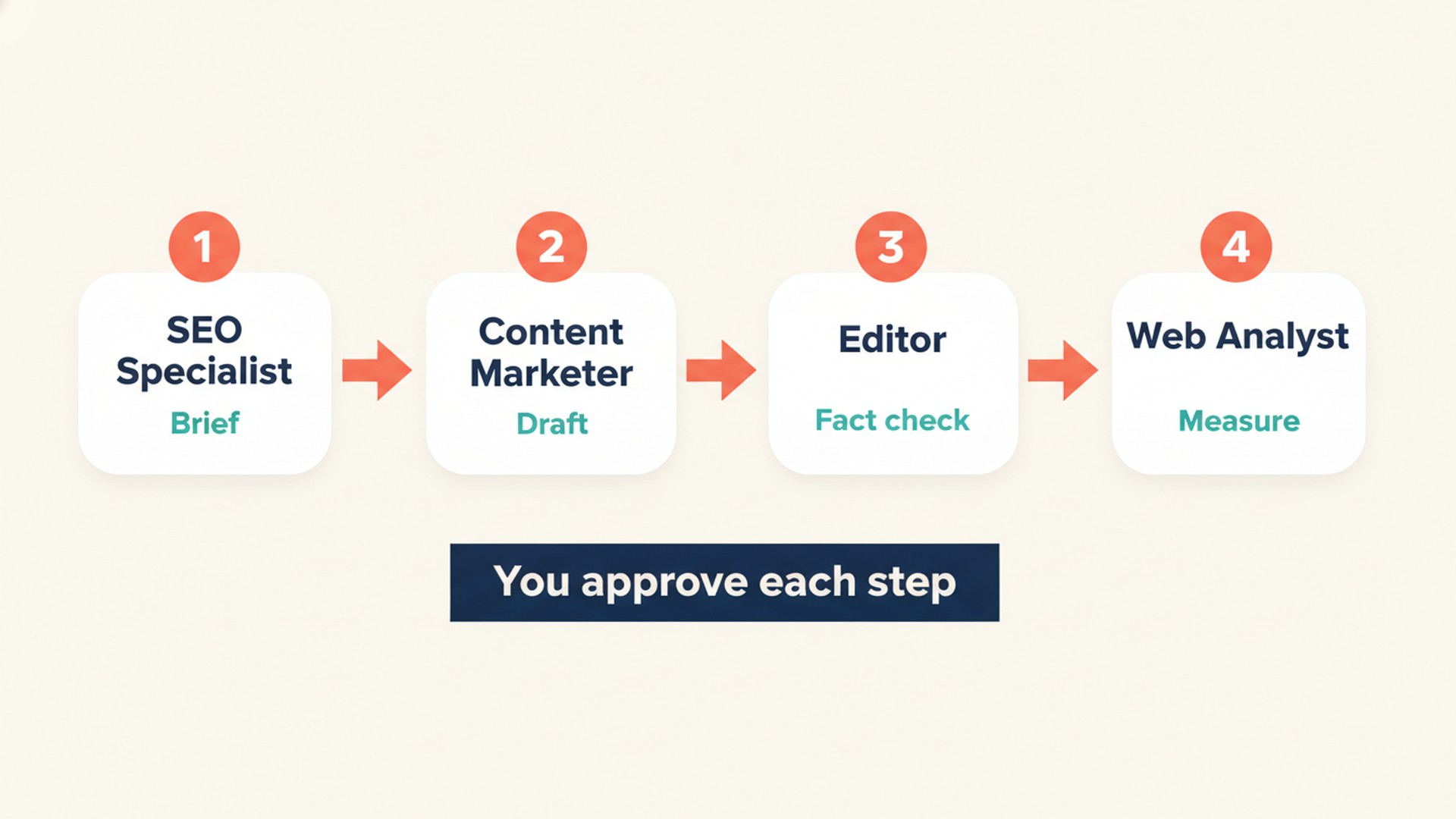
Each role is a separate Bot in your account, and you carry the output to the next one. They do not pass work to each other on their own. The marketing team guide shows how to route work between them.
Which article did we run through it, and what is real here?
The case article is How to give Grok Bot your Search Console and GA4 data. It was briefed, drafted, edited and published on 10 November 2026 for the primary query "grok bot search console" and secondary queries like "grok bot google analytics" and "connect search console to grok bot". How the store itself was planned and built is a separate story: how we built ExtraHeads.
ExtraHeads ran the four steps as one pipeline with its own Grok Bot, not as four separate role Bots handing files to each other. Each step matches the job of one ExtraHeads role, and on 12 November 2026 we ran fresh demos to show what each role's knowledge skill returns for the same inputs. Those demos ran outside Grok Bot, so they are not the run that produced the guide.
| What you see on this page | Source | Date |
|---|---|---|
| Brief excerpt | The real brief for the case guide | 10 November 2026 |
| Edit examples | The real fact-edits file | 10 November 2026 |
| Role demo outputs | Fresh runs of each role's knowledge skill text outside Grok Bot | 12 November 2026 |
| Measurement | Search Console checks | 10 and 12 November 2026 |
Step 1: How does the SEO Specialist turn a keyword into a brief?
The brief named the page type as a how-to with a data-preparation table and two copyable prompts. The gap check showed the top results were vendor pages for one specific connector, and none explained the no-connector route, the reports to export, the 1,000-row limit, or how to brief on the data. No search volume data was used, because no keyword tool export was available.
URL: https://extraheads.com/guides/grok-bot-search-console-ga4-data
PRIMARY QUERY: grok bot search console. SECONDARY: grok bot google analytics; grok bot ga4; connect search console to grok bot; export search console data for ai.
TITLE (use exactly): Grok Bot Search Console and GA4: How to Share Your Data | ExtraHeads
H1 (use exactly): How to give Grok Bot your Search Console and GA4 data
THIS URL DOES NOT COVER (boundaries with neighboring pages):
- General "how to use Grok Bot for SEO" (sitemap, keyword tools, crawl exports, cluster maps, free vs paid SEO template comparison). That is /guides/grok-bot-for-seo. [...]
FACTS AND CONDITIONS (opened and read on 10 November 2026; [...])
G5 The official Grok Bot docs and Cursor help pages checked on 10 November 2026 do not list a Google Search Console app or a Google Analytics app; they do list Google Sheets, Google Drive and Google BigQuery. [...]
READER QUESTIONS TO CLOSE (gap check: the top results for "grok bot search console" are vendor pages for one specific connector; none explains the no-connector route, which reports to export, the 1,000-row limit, or how to brief on the data):
H2 SKELETON [...]
4. How do you get around the 1,000-row export limit?  (S2, S4, S5, A1, A5; explain rows vs totals and anonymized queries; small sites likely fine)
- Planned URL, exact title and H1.
- Primary and secondary queries.
- A "this URL does not cover" list sending general SEO briefing to our SEO bot guide.
- A block of facts with conditions from official Grok Bot, Google Search Console and Google Analytics help pages opened on 10 November 2026.
- A specific code for each fact, such as G5, S2, or A4.
- A gap check of the top results for the primary query.
- A skeleton of nine question H2s.
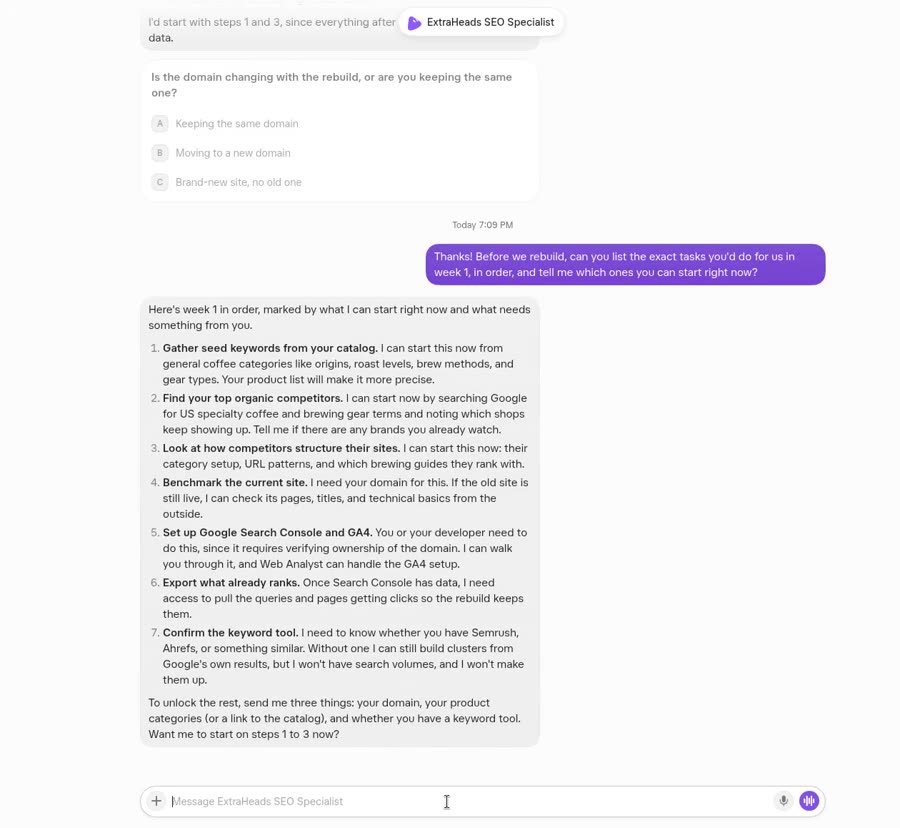
Here is what the SEO Specialist knowledge skill returned in a fresh demo on 12 November 2026, run as instructions for Gemini 3.1 Pro outside Grok Bot with the same inputs.
### 1. Keyword Mapping Table

| Target URL | Primary Keyword | Search Intent | Search Volume (Tool Data) | Secondary Keywords | Status |
| :--- | :--- | :--- | :--- | :--- | :--- |
| /guides/grok-bot-gsc-ga4-data | connect search console to grok bot | Informational | [No tool connected] | grok bot search console, grok bot ga4, grok bot google analytics, export search console data for ai | Planned |

[...]

### 3. Cannibalization Prevention (Avoid Overlap)
To prevent keyword and topic cannibalization with /guides/grok-bot-for-seo, this new page must NOT cover:
* How to write SEO prompts or assign SEO tasks to Grok Bot.
* Strategic advice on using Grok Bot for keyword research, content planning, or technical audits.
* Instructions on how to brief or set up the SEO Specialist bot persona.
Keep the focus strictly on data extraction (from Google), data formatting (CSV/text), and data upload mechanics (into Grok Bot).
The SEO demo correctly marked search volume as "[No tool connected]" instead of guessing, and it fenced off the topics of the general SEO guide. It picked "connect search console to grok bot" as the primary keyword, while the real brief used "grok bot search console". With no volume data, neither choice is backed by numbers, so the owner decides. It also proposed a shorter slug and statement-style H2s, but the owner kept the planned URL and question H2s.
Step 2: How does the brief become a draft?
The real brief was sent in one request to a language model through an API on 10 November 2026. The response came back in 61 seconds as structured JSON with sections, tables, two prompts and an FAQ, totaling 2,377 words. The raw request and response were saved as a log.
A loose phrase in the brief itself traveled into the draft. The skeleton line for the 1,000-row section said "small sites likely fine", and the draft turned it into "1,000 rows usually covers most or all of your meaningful data". The edit replaced it with Google's own wording, which states it "might be most or all of the data" for smaller sites. So the brief needs the same care with wording as the draft.
Here is what the Content Marketer knowledge skill produced in the same kind of fresh demo, given the real brief's query, H1 and H2s.
**H2 4: How do you get around the 1,000-row export limit?**
* Content: Explain how to bypass the standard Google UI export limits using tools like Looker Studio, the API, or BigQuery.
* Primary Source Needed: Google Help Center documentation citing the standard UI row export limits.
* Best Format: Numbered steps.

[...]

# Content Reuse (Hub and Spoke)

* Spoke 1 (Useful how-to): A tactical post on how to bypass the 1,000-row Google export limit for AI analysis. Route to the LinkedIn Specialist.
* Spoke 2 (Direct offers): A newsletter broadcast sharing the two copyable briefing prompts as a lead generation asset. Route to the Email Specialist.
* Spoke 3 (Useful how-to): A screen-recorded tutorial showing the exact clicks to export GA4 reports and upload them to Grok. Route to the Video Marketer.
The Content demo gave every H2 a format and the kind of primary source it needs. Some requested sources answered a different question than the page, such as context window sizes. It suggested numbered steps where the real page used a table, so the person trims the outline before drafting.
Step 3: What did the Editor change before publishing?
Every change was recorded in a fact-edits file with location, old text, new text and the reason, usually the code of the source fact. Ninety edits were recorded: 15 only removed number prefixes from headings and quick-start items. The other 75 corrected facts, hedged claims to match the source wording, added source links, removed a finding the example files could not support, and tightened tone. The published text was 2,885 words, longer than the draft because corrections added conditions and sources.
Four real entries from the case guide's fact-edits file, 10 November 2026. Codes refer to the facts block in the brief.
| Where | Draft text (before) | Published text (after) | Reason in the edit log |
|---|---|---|---|
| 1,000-row section | For a small site, 1,000 rows usually covers most or all of your meaningful data. | Google says that for smaller sites 1,000 rows might be most or all of the data, while larger sites typically have much more. | S2 exact (Google export help) |
| GA4 export table, Google Organic Search Queries row, "What it answers" | How do Search Console clicks map to GA4 metrics? | Which queries bring clicks, shown inside GA4 (Search Console metrics only, no GA4 dimensions). | A4 fact fix (GA4 help on Search Console linking) |
| Illustrated example, "What came back" | ...and a task list marked for the writer to update recipe headers and the developer to fix a broken mobile layout on two pages. | ...and a task list marked by owner: the writer to review the headings on the recipe pages that lost clicks, the developer to check two recipe URLs listed as not indexed, and the site owner to decide which pages to update first. | removed finding not derivable from these files |
| FAQ: Can the bot change my site or my GA4 settings? | No. The bot analyzes the data and provides a plan or tracking brief. You must implement the changes to your live site and GA4 tags yourself. | The SEO Specialist and Web Analyst roles analyze the files and prepare plans and tracking briefs; they do not publish changes or alter live GA4 or GTM tags. You or your developer implement the changes. | E2, E3 (ExtraHeads role scope) |
We ran the same inputs through the Editor and Fact-Checker knowledge skill to see what it flagged.
The same four draft sentences given to the Editor and Fact-Checker knowledge skill in a fresh demo, 12 November 2026, outside Grok Bot. D3 was given in a shortened form. Demo text is quoted verbatim.
| Draft sentence | Fresh Editor demo said | What ExtraHeads published |
|---|---|---|
| D1, 1,000-row sentence | Passed ("D1 passes based on source S2"). Rewrite: "For a small site, a 1,000-row export usually captures all meaningful data." | "Google says that for smaller sites 1,000 rows might be most or all of the data, while larger sites typically have much more." |
| D2, GA4 report row | Flagged against A4. Rewrite: "How do Search Console clicks map to GA4 Landing page, Device, and Country dimensions?" | "Which queries bring clicks, shown inside GA4 (Search Console metrics only, no GA4 dimensions)." |
| D3, example finding | Flagged: outputs "cannot logically be derived from the stated input files". Rewrite: "What came back: a task list marking low-traffic pages for the writer to improve and indexing errors for the developer to fix." | "...and a task list marked by owner: the writer to review the headings on the recipe pages that lost clicks, the developer to check two recipe URLs listed as not indexed, and the site owner to decide which pages to update first." |
| D4, FAQ about changing the site | Flagged. Rewrite: "ExtraHeads roles provide a plan or tracking brief for you to implement. However, Grok Bot can execute changes directly if you give it the required app access." | "The SEO Specialist and Web Analyst roles analyze the files and prepare plans and tracking briefs; they do not publish changes or alter live GA4 or GTM tags. You or your developer implement the changes." |
The Editor demo flagged three of the four sentences the real edit also changed, including the GA4 report row, the example finding the files could not support, and the FAQ answer about changing the site. It passed the 1,000-row sentence and rewrote it as "usually captures all meaningful data", which goes further than Google's wording. Its FAQ rewrite stated more about Grok Bot acting on a site than the source note supports, showing a person still makes the final fact call.
For the visual and publish steps, one diagram was generated and its labels checked by eye before use. The page was rendered into the site template, added to the sitemap file, linked from two older guides, packaged and deployed on 10 November 2026.
Step 4: How do you measure a new page without guessing?
On 10 November 2026, Search Console showed the seven earlier ExtraHeads guides as indexed, so no indexing requests were sent for them. On 12 November 2026 we checked the case guide itself. URL Inspection said "URL is on Google": the page was indexed, discovered via sitemap.xml, last crawled on 11 November 2026 by Googlebot smartphone, and its user-declared canonical was the page itself. The Performance report (web search) then covered only 8 to 10 November 2026 and had no rows for the case guide yet, so 0 impressions were recorded for it. In that window the whole site had 0 clicks and 20 impressions, and the only guide rows were for three older guides: 6 impressions for the sign-up guide and 1 each for two others. So a page can be indexed before the Performance report shows anything for it. It is too early for traffic numbers, and we claim nothing about the case guide's clicks or rankings.
| Check | Where in Search Console | When | What to record |
|---|---|---|---|
| Indexing status of the exact URL | URL Inspection tool: enter the full URL | First week after publishing. After an indexing request, Google says indexing typically takes a few days | The status line, and whether the URL is unknown to Google and needs an indexing request |
| Whether the page appears as indexed | Page indexing report | First week, then after 28 days | Indexed, or the reason Google gives for not indexing it |
| Queries and clicks for the exact page | Performance report, Search results, filtered to the exact page URL | After 28 days | Clicks, Impressions, CTR and Average position from the Queries tab, with the date range and filters used |
| The primary query row | Performance report, page filter plus a query filter for the primary query | After 28 days | Impressions, clicks and average position for that query on this page, or a note that it does not appear |
| Same check again after an equal later period | Performance report, same filters, comparing two equal completed periods | Every 28 days after that | The change against the first period, leaving out the newest days because they can be preliminary |
Here is what the Web Analyst knowledge skill returned when asked for a four-week plan, in a fresh demo with the same facts we had.
# Signals to Act vs. Do Not Act
* Act: URL Inspection tool shows "Discovered - currently not indexed" or "Crawled - currently not indexed" by the end of Week 2. (Action: Request indexing or check for crawl anomalies).
* Act: GSC shows impressions for the primary query but zero clicks by Week 4. (Action: Review title and meta description for SERP appeal).
* Do Not Act: Zero clicks or impressions in Week 1. (Normal indexing delay).
* Do Not Act: Average position ranking fluctuates wildly in Weeks 2-3. (Normal algorithmic testing for new content).

[...]

# Exact Data Needed from Owner
To execute this plan, please provide:
1. Read access to your Google Search Console account.
2. Read access to your Google Analytics 4 property.
3. A list of the exact URLs and publication dates for the 7 older guides to build the baseline comparison.
4. Confirmation of any custom GA4 events currently active on your guides (e.g., generate_lead, newsletter sign_up).
The Analyst demo proposed URL Inspection first, then the Performance report filtered to the exact page, a comparison against the first 28 days of earlier guides, clear act and do-not-act signals, and a list of data it needs from the owner. It called position swings "normal algorithmic testing for new content", which is not stated in the Google help pages we checked, so we would not rely on that line.
The next check comes about 28 days after publishing. It will filter the Performance report to the exact case guide URL, then add a query filter for "grok bot search console", record clicks, impressions, CTR and average position with the date range used, and look at the Page indexing report again. This section will be updated with those numbers.
How do you run this workflow on your next article?
- Pick one query and one URL.
- Check your own pages for overlap.
- Brief with dated facts and boundaries.
- Draft only from the brief.
- Edit with a log recording location, old text, new text, and why.
- Check visuals by eye.
- Publish, add to sitemap and link from related pages.
- Record the publish date, schedule the checks, and feed findings into the next brief.
You can use these four copyable prompts to run the steps yourself.
Act as an SEO Specialist.
Target query: [Insert primary query]
Target URL: [Insert planned URL]
Existing URLs to avoid overlapping: [List existing related URLs]
Attached exports: [Attach any if available]

Task: Return a one-row keyword map for this URL. Write an on-page brief with question H2s. Include a "this URL does not cover" list to set boundaries. Provide a facts table with the source URL and check date for each claim. List any open questions.

Rules: Do not invent search volumes. Mark unknown values as "to check".
Act as a Content Marketer.
Task: Write the article sections using only the attached brief and facts table.

Rules:
- Keep conditions next to their facts.
- Mark any claim without a source as "[needs source]".
- Do not invent numbers or limits.
- Return the draft.
- Provide a list of 2 to 3 reuse pieces based on this content.
Act as an Editor and Fact-Checker.
Task: Check the attached draft against the provided facts table and linked sources.

Rules:
- Return a table with columns: Location, Old Text, New Text, Reason or Source.
- Flag claims you cannot verify instead of rewriting them.
- Do not add new facts.
- Separate tone edits from fact edits.
Act as a Web Analyst.
Page URL: [Insert published URL]
Publish date: [Insert date]
Primary query: [Insert query]
Attached exports: [Attach Search Console exports with date ranges and filters]

Task: Return a measurement plan comparing equal, completed periods. Define what counts as a signal to act and a signal not to act. State what data is missing.

Rules: Do not include industry benchmarks or expected results.
What will a person still do in this workflow?
- Choose the primary query and the planned URL.
- Approve the brief boundaries.
- Check facts against primary sources.
- Publish and deploy the page to the live site.
- Read the measurement data and decide the next change.
For where the line sits between what a bot prepares and what you do, see what AI marketing bots can and cannot do.
Where do the four ExtraHeads roles fit?
ExtraHeads sells the four role templates named on this page, so it has a commercial interest. ExtraHeads is independent, not affiliated with xAI or X, and does not sell Grok Bot access. The case is ExtraHeads' own guide, not a client result.
The SEO Specialist plans the organic search work and maps the keyword to the URL to prevent cannibalization. The Content Marketer plans the piece and how it is reused across channels, and drafts from the brief. The Editor and Fact-Checker strips generic phrasing, runs its three-level fact check and flags what still needs a source; it needs your reference material and does not guarantee flawless automated verification. Finally, the Web Analyst reads the Search Console and GA4 exports you share and drafts the measurement plan; it has no built-in connection to either tool.
You still route the work between them, verify the final facts, publish the output, and read the numbers. Each role template is $19, or you can get all 22 roles for $99, paid once and added to your own Grok Bot account. The Editor and Fact-Checker sample shows the report format.
Frequently asked questions
What is an SEO content workflow?
An SEO content workflow is a series of four handoffs from a target keyword to a measured result. It moves from briefing boundaries and facts to drafting, checking claims against sources, and measuring indexing and clicks on a schedule.
Do the four roles pass work to each other automatically?
No, each role is a separate Bot in your account. You route the output from one Bot to the next as a person.
Can an AI draft be published without editing?
In this case, 90 edits were logged before publishing, 75 of them beyond heading numbers. A person must verify claims against primary sources and correct phrasing that strays from the briefed facts.
How soon can you measure a new article?
You can check the URL Inspection tool in the first week to see if Google knows the URL or if you need to request indexing. In our plan, the first Performance check for clicks and queries comes after 28 days.
Did this guide get traffic?
Not yet. On 12 November 2026 Search Console showed the case guide as indexed ("URL is on Google"), but the Performance report covered only 8 to 10 November and had no rows for it, so 0 impressions were recorded. It is too early for traffic numbers. The next check, about 28 days after publishing, will look at clicks, impressions, CTR and average position for the exact URL and its primary query.