How to fact-check AI-written marketing content
To fact-check AI content, split the draft into single claims, verify each against a primary source such as the official price or help page, keep conditions next to the facts, log every change with its reason, and check the title, meta description and alt text too. Google says AI output may contain inaccuracies and should be fact-checked manually before publishing. This page shows a real edit log from one ExtraHeads draft and a fresh AI fact-check demo.
ExtraHeads sells the Editor and Fact-Checker role template named on this page, so it has a commercial interest. ExtraHeads is independent, not affiliated with xAI or X, and does not sell Grok Bot access. The worked example is ExtraHeads' own draft, not a client result.
Quick start
- Split the draft into single checkable claims.
- Verify each claim against a primary source.
- Keep conditions next to the facts.
- Log every change with its location and reason.
- Check metadata and get a second sign-off.
Why does AI-written marketing content need a fact check?
Generative AI models do not retrieve facts; they predict a likely sequence of words based on their training data. Because of this, their outputs may contain inaccuracies, which Google also calls hallucinations. Google states in its guidance on generative AI that it is critical to manually fact-check and review all AI-generated content for accuracy and trustworthiness before publishing.
This manual review also applies to metadata such as title elements, meta descriptions, structured data and image alt text, which can appear in Search results (same Google page).
To see where a marketing bot's job ends and yours starts, read our guide on what AI marketing bots can and cannot do.
Which claims should you check, and how do you verify each type?
Breaking a marketing draft down into claim types helps you find the right primary source for each fact.
| Claim type | What tends to go wrong | How to verify | Source to use |
|---|---|---|---|
| Prices and plans | Missing conditions like tax or billing periods | Confirm the price, currency and any condition | Official pricing page |
| Limits and numbers | Vague or averaged numbers instead of exact limits | Match the exact active limits per plan | Official documentation |
| Product features and how something works | Overclaims or assuming a feature is automatic | Check the feature and its conditions in the help page: which plan has it and whether it needs approval | Product help pages |
| Comparisons with competitors | Feature gaps that are out of date, or claims about a rival you never checked | Read the competitor's current page or help docs and note the check date | Competitor's current page |
| Statistics and studies | Incorrect numbers or hallucinated findings | Read the original dataset to match the numbers | Original study or dataset |
| Quotes and testimonials | Altered wording or fabricated quotes | Compare text to the original statement | Signed customer approval or original text |
| Disclosures and affiliations | Incomplete disclosures leaving out specific partners | Check every company you name and state plainly who you are and are not affiliated with | Your own company facts and any partner agreements |
| Instructions and sign-up steps | Pointing to only one route or an outdated flow | Walk through the steps yourself to confirm they work | The official help page, plus a run through the steps yourself |
| Dates and new or latest claims | Stale information presented as current | Verify the release date and the check date | Official release notes, changelog or announcement, with its date |
| Titles, meta descriptions and alt text | Promises the page body does not support, or a fact fixed in the text but not in the metadata | Match the metadata to the verified page text | The verified page text |
Google says its systems give even more weight to trust signals for health, finance or safety topics (helpful content guidance). Send those claims to a qualified reviewer to verify.
How do you fact-check AI content step by step?
- Split the draft into single checkable claims and give each an ID.
- Check each claim against a primary source, never against the AI's own answer or a competitor blog.
- Open every cited link and confirm it exists and says what the draft says.
- Keep the condition, such as before tax or per month, in the same sentence as the fact.
- Record the source URL and the check date.
- Mark anything you cannot verify as needs source or remove it; never fill it in with guesses.
- Log every change with its location, old text, new text and the reason for the change.
- Check numbers, dates and math for internal consistency.
- Check the title, meta description, image alt text and structured data, then have a person sign off before publishing.
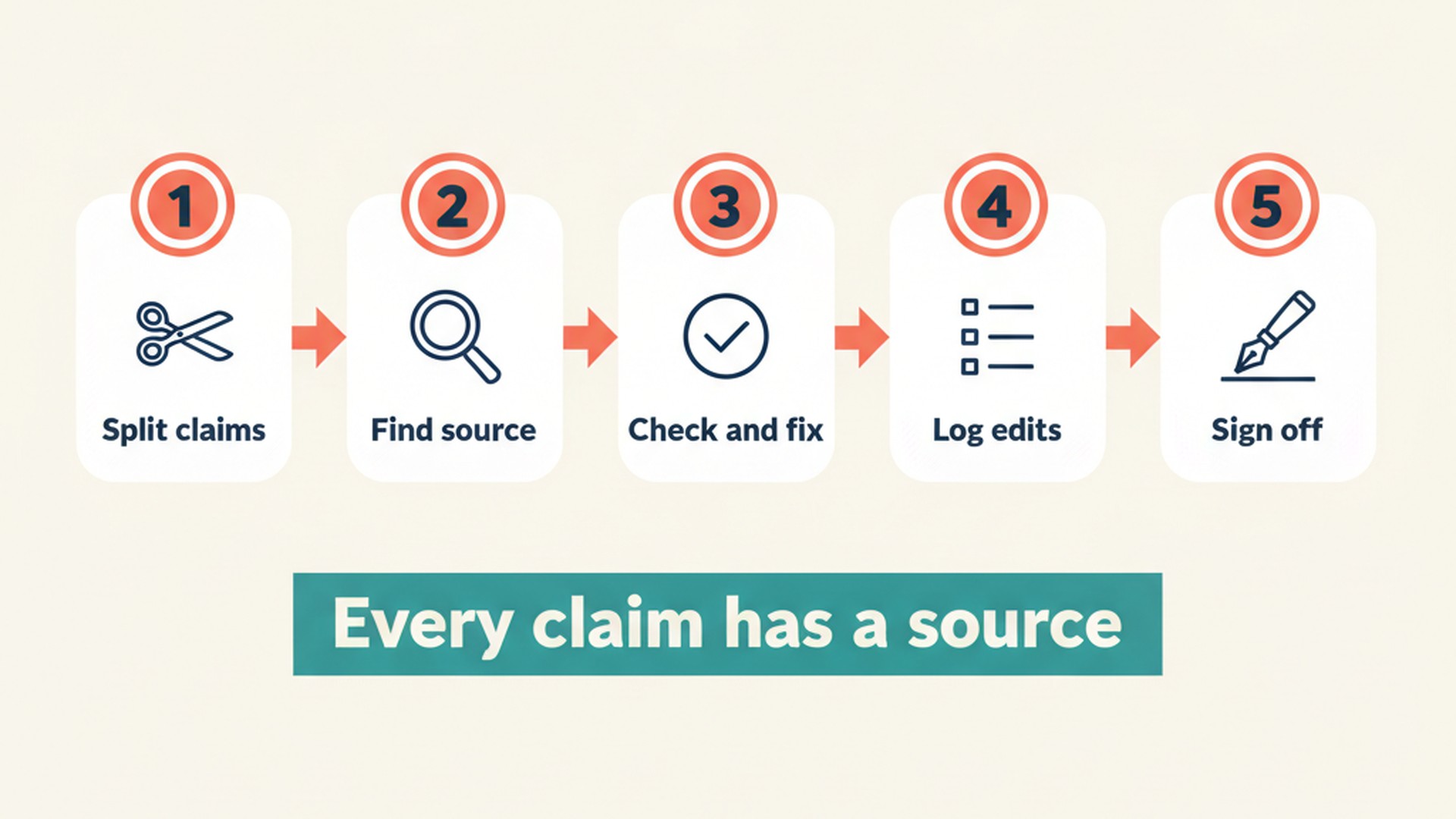
Keeping an edit log matters because it lets a second person check the check. A clear record of what changed and why also shows whether an edit introduced a new error.
What does a real fact check look like?
On 11 November 2026, ExtraHeads generated the draft of Grok Bot vs ChatGPT for marketing with Gemini 3.1 Pro through an API. Before publishing, we logged 33 edits in a fact-edits file covering the location, old text, new text and reason.
Six real entries from the fact-edits file of the Grok Bot vs ChatGPT guide, 11 November 2026. "Before" is the raw Gemini 3.1 Pro draft; "after" is the published text. Codes in the last column refer to the source facts in our brief (G = Grok Bot docs, O = OpenAI help pages, E = ExtraHeads facts).
| Claim type | AI draft (before) | Published (after) | Reason in the edit log |
|---|---|---|---|
| Price with a condition (price table, Premium row) | $30/month or $300/year | $30 a month or $300 a year, before tax | G7 + source |
| Plan limit (ChatGPT scheduled tasks) | Yes, active task limits apply by plan | Yes: up to 3 active tasks on Free and Go, 5 on Plus, 15 on Pro; hourly schedules need a paid plan | O6 exact limits |
| Feature claim (FAQ on approvals) | Both tools require approval for actions that send messages or change external data. You can set custom rules in Grok Bot or use ChatGPT's built-in pauses to review important actions before they happen. | Set it up so neither does. In ChatGPT, actions that send a message or change external data may require approval, and the task pauses until you review it. In Grok Bot, Auto Review checks actions, and a Custom Rule set to Ask first, such as one for sending an email, always stops a matching action. | O6, G5; removed overclaim |
| Disclosure | ExtraHeads sells ready role templates for Grok Bot, so we have a commercial interest in it. We are independent, not affiliated with xAI, and do not sell Grok Bot access. These templates do not run in ChatGPT. | ExtraHeads sells ready AI specialist templates for Grok Bot, with role instructions, skills and routines, so it has a commercial interest in Grok Bot. ExtraHeads is independent, not affiliated with xAI, X or OpenAI, and does not sell Grok Bot or ChatGPT access. The templates are added to your own Grok Bot account and do not run in ChatGPT. | E1 full disclosure, third person like other guides |
| Sign-up instruction | Remember to sign up for Grok Bot directly via xAI first. | Grok Bot access itself comes with an X Subscription plan or an existing Cursor plan, not from ExtraHeads; the signup guide shows the steps. | G7, existing guide: access also via Cursor |
| Unsupported claim (FAQ) | It handles multi-step tasks, while the standard chat app is for fast conversational help. | Removed. New answer: "This page compares Grok Bot, not the Grok chat app, with ChatGPT." | removed unverified claim about Grok chat app |
The edits corrected a plan price that missed the tax condition, a vague plan limit changed to exact active task limits per plan, and an overclaim that both tools require approval before sending. They also fixed an incomplete disclosure that left out X and OpenAI, a sign-up instruction that pointed to only one route, while access comes with an X Subscription plan or an existing Cursor plan, and an FAQ answer with a claim about the Grok chat app that our sources did not support, so we removed it. Read our SEO content workflow case study to see the full brief, draft and measurement steps around this fact check.
Can you use AI to fact-check AI content?
On 13 November 2026, we ran a fresh demo on Gemini 3.1 Pro outside Grok Bot to see how much of this check an AI catches on its own. A session in your own Grok Bot account will differ, because there the role also has its role instructions, its memory and the files and apps you give it.
What we gave: the ExtraHeads Editor and Fact-Checker knowledge skill (the reference file that ships inside the role template) as the instructions, five raw draft sentences from that page (D1 to D5) and five source notes copied from the official pages (S1 to S5).
DRAFT SENTENCES
D1 (price table, Grok Bot row): "Grok Bot via The X Subscription Premium: $30/month or $300/year."
D2 (feature table, ChatGPT, recurring work on a schedule): "Yes, active task limits apply by plan."
D3 (FAQ: Does either tool post to social media without approval?): "Both tools require approval for actions that send messages or change external data. You can set custom rules in Grok Bot or use ChatGPT's built-in pauses to review important actions before they happen."
D4 (disclosure): "We are independent, not affiliated with xAI, and do not sell Grok Bot access. These templates do not run in ChatGPT."
D5 (closing): "Remember to sign up for Grok Bot directly via xAI first."

SOURCE NOTES (the owner copied these from official pages on 11 November 2026; treat them as the only reference material)
S1 docs.x.ai/x-subscription/pricing: Grok Bot is included on Premium ($30/month or $300/year), Super and Ultra plans of The X Subscription; Plus ($8/month) does not include Grok Bot. List prices exclude tax.
S2 help.openai.com scheduled tasks article: active task limits are 3 for Free and Go, 5 for Plus, 10 for Business, 15 for Pro. Actions that send a message or change external data may need approval, and the task pauses until you review it.
S3 docs.x.ai/grok-bot/how-grok-bot-works: before a Bot runs a command, uses an app or acts on its computer, Auto Review checks the action; you can add Custom Rules such as "Ask first" for sending an email.
S4 docs.x.ai Grok Bot FAQ: Grok Bot comes with Premium, Super and Ultra on The X Subscription, and with legacy Cursor Pro, Pro+, Ultra and self-serve Teams plans.
S5 ExtraHeads own facts: ExtraHeads is independent, not affiliated with xAI, X or OpenAI, and does not sell Grok Bot or ChatGPT access. Its templates are added to your own Grok Bot account and do not run in ChatGPT.
What we asked: we asked for a table with an ID, claim type, verdict, source used, suggested rewrite, and a list of what it could not verify.
What we got: an answer in 21 seconds, quoted here in full and unedited.
### Editorial Delivery Report

**Document Status**: Needs Revisions
**Word Count**: 73 vs. 87

**Fact-Check Summary**:
* Internal: Pass
* Brand: Fail (Missing full legal disclosures in D4)
* External: Fail (Minor inaccuracies regarding product features and sign-up paths)

| ID | Claim type | Verdict | Source used | Suggested rewrite |
|---|---|---|---|---|
| D1 | Pricing | Fix | S1 | Grok Bot via The X Subscription Premium: $30/month or $300/year (excluding tax). |
| D2 | Feature limits | Fix | S2 | Yes, active task limits apply by plan (ranging from 3 on Free/Go to 15 on Pro). |
| D3 | Product functionality | Fix | S2, S3 | ChatGPT may pause tasks to review important actions, while Grok Bot uses Auto Review and custom rules for approvals. |
| D4 | Brand disclosure | Fix | S5 | We are independent, not affiliated with xAI, X, or OpenAI, and do not sell Grok Bot or ChatGPT access. These templates do not run in ChatGPT. |
| D5 | User instruction | Fix | S1, S4 | Remember to secure Grok Bot access via The X Subscription first. |

**Unverified Claims from Draft:**
* D3 states both tools absolutely "require" approval for external actions. Source S2 indicates ChatGPT "may need" approval, which is conditional, not absolute.
* D5 tells the user to sign up "directly via xAI". Sources S1 and S4 only mention access via "The X Subscription" or legacy plans, which does not confirm a direct xAI sign-up portal.

**Next Steps & Handoffs**:
* **Content Marketer**: Please update the draft using the suggested rewrites above to ensure absolute accuracy.
* **Landing Page Builder**: Once updated, push the corrected copy to the staging site for final review.
The demo rewrites next to what ExtraHeads published on 11 November 2026. Demo text is quoted verbatim.
| Draft sentence | Editor demo rewrite | What ExtraHeads published | Our note |
|---|---|---|---|
| D1, Premium price | "Grok Bot via The X Subscription Premium: $30/month or $300/year (excluding tax)." | $30 a month or $300 a year, before tax | Matches the source: tax condition added. |
| D2, ChatGPT task limits | "Yes, active task limits apply by plan (ranging from 3 on Free/Go to 15 on Pro)." | Yes: up to 3 active tasks on Free and Go, 5 on Plus, 15 on Pro; hourly schedules need a paid plan | Dropped the 5 for Plus and 10 for Business from note S2. |
| D3, approvals FAQ | "ChatGPT may pause tasks to review important actions, while Grok Bot uses Auto Review and custom rules for approvals." | Set it up so neither does. In ChatGPT, actions that send a message or change external data may require approval, and the task pauses until you review it. In Grok Bot, Auto Review checks actions, and a Custom Rule set to Ask first, such as one for sending an email, always stops a matching action. | Caught "require" vs "may need"; did not name the "Ask first" rule from S3. |
| D4, disclosure | "We are independent, not affiliated with xAI, X, or OpenAI, and do not sell Grok Bot or ChatGPT access. These templates do not run in ChatGPT." | ExtraHeads sells ready AI specialist templates for Grok Bot, with role instructions, skills and routines, so it has a commercial interest in Grok Bot. ExtraHeads is independent, not affiliated with xAI, X or OpenAI, and does not sell Grok Bot or ChatGPT access. The templates are added to your own Grok Bot account and do not run in ChatGPT. | Matches note S5. |
| D5, sign-up | "Remember to secure Grok Bot access via The X Subscription first." | Grok Bot access itself comes with an X Subscription plan or an existing Cursor plan, not from ExtraHeads; the signup guide shows the steps. | Dropped the legacy Cursor plans listed in note S4. |
The Editor knowledge skill marked all five sentences as Fix and matched each to the right source note. It added the tax condition to the price, completed the disclosure with X and OpenAI, and caught that the draft said both tools "require" approval while the source says ChatGPT actions "may need" approval. However, its plan-limit rewrite gave only the range from 3 to 15 and dropped the 5 for Plus and 10 for Business that were in the note. Its sign-up rewrite pointed only to The X Subscription and dropped the legacy Cursor plans, going less far than the source. Its report header stated a word count of 73 versus 87, while the sentences have 82 words and the rewrites 84, so the checker's own numbers needed checking too. It also proposed a handoff to push the copy to a staging site, which is a step we do not have. An AI checker is useful for finding and sorting claims, but a person still reads the sources.
Which sources count when you verify a claim?
| Use this | Not enough on its own |
|---|---|
| The official pricing or help page | A review site or the AI's summary of it |
| The original study or dataset | A blog post quoting the study |
| Your own product documentation and product owner | The AI draft or an untraceable sales deck |
| The competitor's own current page with a check date | A comparison article |
| The quoted person's original statement or your signed customer approval | A quote the AI produced |
| Google's own Search Central docs | Third-party summaries of Google rules |
Always open every link the AI cites to confirm it exists and says the exact same thing as the draft. A real source is not automatically a good one, so you must trace the claim back to the primary origin.
What does Google say about publishing AI-written content?
- Google rewards original, high-quality content however it is produced, focusing on quality not the method of creation, as noted in its Search Central Blog.
- Using automation, including AI, to generate content with the primary purpose of manipulating search rankings violates its spam policies.
- Using generative AI tools to generate many pages without adding value for users is an example of scaled content abuse.
- AI or automation disclosures are useful where someone might ask how the content was created, but giving AI an author byline is probably not the best way to make that clear (same Google post).
- The self-assessment for creating helpful content asks if the content has any easily-verified factual errors, and the same page says trust is the most important part of E-E-A-T.
A fact check does not guarantee rankings; it removes errors readers and reviewers can see.
Which prompts and checklist can you copy?
Use these copyable prompts and this pre-publish checklist to run a repeatable verification process on your next marketing draft.
Split the attached draft into single checkable claims.
Give each claim an ID and a claim type from the table.
Quote the exact draft text for each claim.
Note any condition attached to the claim.
List the primary source the claim needs for verification.
Do not judge the truth of the claim yet.
Do not add outside facts.
Check each claim against the attached source notes and the linked primary pages only.
Return a table with ID, claim type, and a verdict of Pass, Fix, Needs source, or Remove.
Include the exact source sentence used for the check.
Provide a suggested rewrite that keeps the condition in the same sentence as the fact.
List what you could not verify.
Never rewrite an unverified claim into a confident one.
Separate tone edits from fact edits.
[ ] Every claim has an ID and a source URL with a check date.
[ ] Prices include the billing period and tax conditions.
[ ] Limits are stated exactly, per plan.
[ ] Features match the product documentation.
[ ] Competitor comparisons are dated and current.
[ ] No statistic is used without its original source.
[ ] Quotes match the original statement; customer quotes are approved.
[ ] Disclosures and affiliations are complete.
[ ] Instructions and sign-up steps are tested or sourced.
[ ] Title, meta description, alt text and structured data are checked.
[ ] Numbers, dates and math are internally consistent.
[ ] The edit log is saved with location, old text, new text and reason.
[ ] A second person signed off on the final text.
What does a person still do in a fact check?
- Supply the primary source material and product facts.
- Read the source for every flagged claim.
- Decide on claims that sit in gray areas or touch health, finance, legal or safety.
- Approve the edit log.
- Publish the final text.
You can view our sample report to see the format the ExtraHeads Editor and Fact-Checker returns.
Where does the ExtraHeads Editor role fit?
ExtraHeads sells the Editor and Fact-Checker role template named on this page, so it has a commercial interest. ExtraHeads is independent, not affiliated with xAI or X, and does not sell Grok Bot access.
The Editor and Fact-Checker strips generic AI phrasing, applies structural formulas like PAS and AIDA, and runs a three-level fact check covering internal consistency, brand accuracy against your documentation, and external verification against primary sources. It flags what needs a source and returns an editorial delivery report with the clean text. It requires web access and the reference material you supply, and it does not guarantee flawless automated verification. It does not include built-in plagiarism checkers, grammar software subscriptions or publishing.
You still review the sources, make the final call on every edit, and handle the publishing. The Editor and Fact-Checker is $19 as one role, or $99 for all 22 roles, paid once. The sample shows the report format.
Frequently asked questions
How do you fact-check AI-generated content?
Split the draft into single claims, verify each against a primary source, and keep conditions next to the facts. Log every change and check the metadata before a second person signs off.
Can ChatGPT or Grok fact-check its own writing?
An AI model can sort and flag claims against sources you give it, as in our demo on Gemini 3.1 Pro. In that demo it also dropped details from two source notes and got its own word count wrong, so a person still reads the sources.
Does Google penalize AI-written content?
Google says it rewards high-quality content however it is produced, and appropriate use of AI is not against its guidelines. Using automation, including AI, to generate content with the primary purpose of manipulating search rankings violates its spam policies.
Do I need to disclose AI use?
Google, in its own guidance, states that AI or automation disclosures are useful where someone might ask how the content was created. Giving AI an author byline is probably not the best way to make this clear.
How long does a fact check take?
It depends entirely on the number of claims in the draft. A person still needs to read the primary sources and make the final call.