How to respond to a negative Google review
To respond to a negative Google review, open your verified Business Profile, select Read reviews, write a short, professional reply that names the issue, avoids private details and promotional offers, and, if the situation is complex, invites the person to contact you privately. Google reviews the reply before it is posted. A genuine negative review is not removed just because you dislike it, but you can report a review that may violate Google's policies. This page includes official steps, policy limits, and copyable example replies.
ExtraHeads sells the SERM Specialist role template named on this page, so it has a commercial interest. ExtraHeads is independent, not affiliated with xAI or X, and does not sell Grok Bot access. The reply templates on this page are ExtraHeads examples, not official Google text and not client results.
Quick start
- Verify your business on Google. You can reply to reviews only after the Business Profile is verified.
- Open your Business Profile and select Read reviews.
- Next to the review you want to address, select Reply.
- Read the review. If it may violate Google's content policies, you can report it. If it describes a genuine experience, draft a short, professional reply.
- Draft a short, professional response offline, making sure there are no private details or incentives included.
- Enter your approved text into the dialog box and select Reply.
- Wait for Google to review the text before it appears publicly on your profile.
How do you reply to a negative Google review in your Business Profile?
Before you can reply to reviews, you must verify your business. After it is verified, you can reply to reviews on your Business Profile. Reviews are available only in certain countries or regions and for certain business categories, and that availability may change over time. Other review sites have their own rules; this page covers Google reviews.
According to the official Google Business Profile Help page (checked on 14 November 2026), these are the steps to read and reply:
- Go to your Business Profile.
- Select Read reviews.
- Next to the review you want to reply to, select Reply.
- In the dialog box, enter your reply.
- Select Reply.
After you select Reply, Google reviews your replies to make sure they follow Google's content policies. If a reply is not approved to be posted, you will be asked to edit it. Replies usually take up to 10 minutes to review, but sometimes a review can take up to 30 days. This timing is about Google reviewing the business reply, not about how fast a customer review appears.
If the reply is approved, it is publicly posted under the customer's review. It will appear as if your business replied, and your personal name will not be shown. The person who wrote the review is notified when you reply. Customers can still change their review after reading your reply. If they change it, the date on their review will change to show when the latest update was made.
If you need to change your text later, go to your Business Profile, select Read reviews, under the reply select Edit, edit it in the dialog box, then select Update. To delete a reply, select Delete.
What should a helpful reply to a negative Google review include?
Google's tips for review replies (checked on 14 November 2026) say to value all reviews, because a mix of positive and negative feedback often feels more trustworthy. Negative reviews are not necessarily a sign of poor business practices; they can help you understand expectations. Providing constructive replies and following up on concerns can show that you care and may even encourage the customer to update their review. That is not a guarantee that they will update it.
| Helpful element | How to apply it from Google's tips |
|---|---|
| Professional and polite tone | Keep replies clear and helpful. Apologize when appropriate and show empathy so the customer feels understood. |
| Short and simple length | Keep the text brief. If a reply is too long people might stop reading. |
| Personalized details | Address the reviewer by name, acknowledge their specific feedback, and use a personal sign-off with your name or initials. |
| Honesty and limitations | Acknowledge if any mistakes were made, but do not take responsibility for things outside your control. Explain what you can and cannot do. Google's example is a cancelled event caused by bad weather, where you can explain that you monitor the weather and send advance cancellation notices when possible. |
| Timely response | Respond in a timely manner. Make your replies count by sharing a helpful update or answering a question. |
| Private continuation | If a situation is complex, politely request that the reviewer contact you via phone or email to resolve the issue privately. |
What should you leave out of a public Google review reply?
When you reply, the text must follow Google's content policies. Google's review reply tips also say what to leave out of a public response.
- Never share a reviewer's private information. Do not distribute or post personal information without consent.
- Never engage in personal attacks.
- Avoid using your response to offer deals or promotions. Be conversational, not promotional.
- Never offer incentives, like free or discounted goods or services, in exchange for customers to change reviews or remove negative reviews. This is considered fake and misleading content and is strictly prohibited.
While you cannot post a customer's private data, Google does allow merchants to post contact information related to their business, including phone, email, or social media handles. Providing your business email so a customer can reach out is allowed.
Can you get a negative Google review removed?
A genuine negative review stays visible unless it violates Google's policies. You can report any review, but only those that violate Google policies are eligible for removal. Flagged reviews that violate content policies are removed and will no longer show on Maps and Search. Google's help page on reporting inappropriate reviews (checked on 14 November 2026) states these limits.
Do not report a review just because you disagree with it or dislike it. Google does not get involved in conflict between businesses and customers. Negative reviews can highlight areas for improvement and are not always a sign of poor service. Do not report a genuine but unwelcome negative review as spam.
How do you report a Google review that may violate Google's policies?
If you find a review that may violate Google policies, you can report it for removal from your Business Profile. Use the official steps below, which are on Google's reporting help page.
- Go to your Business Profile.
- Select Read reviews.
- Next to the review you would like to flag, select Report.
- Select the reason to flag the review (examples Google gives: "Spam" or "Profanity").
- Select Send report.
Review evaluation typically takes several days. You can check the status of your report in the Reviews Management Tool. The possible statuses are: Decision pending (the review is flagged but has not been evaluated yet); Report reviewed - no policy violation (no policy violation was found; if you disagree, you can submit a one-time appeal); and Escalated - check your email for updates (the appeal has been escalated, and you will get an email about the final decision).
If a flagged review does not qualify for removal, you can submit a one-time appeal through the Reviews Management Tool; you can select up to 10 reviews. When the appeal is assessed, you get an email with the result: if it violates policies it will be removed; if it complies it will remain live. Google also uses automated spam detection to remove reviews identified as spam. Occasionally the system may mistakenly remove legitimate reviews; if that happens, Google says to contact support for assistance. Note that merchants in the EEA can report third-party reviews directly on Google.
If the Business Profile has been targeted by an extortion scam involving negative reviews, use Google's separate help page for extortion. These scams may involve a sudden increase in 1-star and 2-star reviews, followed by someone demanding money, goods, or services in exchange for removing the negative reviews. Do not engage with or pay the malicious individuals; this can encourage further attempts and does not guarantee the removal of reviews. Gather evidence, including screenshots of written demands, links to the suspicious reviews, and contact details of the sender, and report it promptly through the merchant extortion report form. This reporting channel is exclusively for cases where you have been directly subjected to an extortion attempt demanding money or favors in exchange for review removal.
What do Google's review policies say about fake reviews and review gating?
Reviews and other user contributions to Google Maps must reflect a genuine experience. Google does not allow merchants or users to solicit or encourage the posting of content that does not represent a genuine experience. Customers must be signed into a Google Account to leave a review; they can set one up with a non-Gmail email address.
According to the Maps User Generated Content Policy, Google does not allow merchants to discourage or prohibit negative reviews, or selectively solicit positive reviews from customers. This selective solicitation is often called review gating. Google does allow merchants to solicit or encourage the posting of content that does represent a genuine experience, without offering incentives to do so or attempting to influence the rating or the contents of the review.
Rating manipulation includes incentivized or biased reviews, which are not allowed and will be removed from Maps. Google does not allow merchants or users to offer incentives, such as payment, discounts, free goods or services, in exchange for posting any review or revision or removal of a negative review. Google does not allow posting content on a competitor's place or business to undermine that business's or product's reputation.
When soliciting reviews, merchants should not require or pressure users to leave ratings or write reviews while on the premises, nor should they request that specific content be included. This includes merchants requesting that staff solicit a certain number of reviews, or reviews that include specific content, including content that identifies a staff member.
Businesses that violate Google's Fake Engagement policy may be subject to restrictions if Google determines violative activity on their profile. Examples include, but are not limited to: the Business Profile will not be able to receive new reviews or ratings for a set period of time; existing reviews or ratings will be unpublished for a set period of time; the Business Profile will display a warning to let consumers know that fake reviews were removed. Google will notify business owners via email if it plans to apply a restriction, and businesses can appeal.
Which reply templates can you copy and adapt?
Here are short example replies for a fictional business named Northfield Hardware. These ExtraHeads examples are for learning purposes and must be adapted to your situation. They demonstrate how to handle different types of feedback ethically, without offering incentives or violating policy.
| Situation | Example Reply |
|---|---|
| A fair, specific complaint the business can work on | Hi David. We are sorry the paint mixing machine was down when you visited on Tuesday. We have scheduled maintenance for this week to get it fixed. Please reach out to us at [email protected] so we can help you with your project. |
| A vague negative review with almost no detail | Hello Mary. We are sorry this was not a good experience, and we would like to understand what happened. Please call us at the store number on our profile so we can learn more. - John |
| A complaint about something outside the business's control | Hi Robert. We understand it is frustrating that the delivery was delayed. Severe road flooding closed the main highway all day, which meant our drivers could not safely reach your area. We monitor weather conditions and try to send advance cancellation notices when possible. Please email us at [email protected] so we can reschedule. |
| A review you believe may violate policy | Hello. We take feedback seriously and would like to look into this. Please contact us at the store phone number listed on our Business Profile so we can review it. |
You can also prompt an AI assistant to write a draft for you. Paste the prompt below into your preferred tool, fill in the brackets, and review the output carefully before posting.
Draft a short, professional, non-promotional reply to the following Google review for my business.

Rules:
1. Keep it brief and polite.
2. Do not invent facts, names, or events.
3. Do not include any discounts, coupon codes, or incentives to change the review.
4. Do not include private details about the customer.
5. Leave a blank placeholder for my business phone number or email so I can invite them to contact me privately if the situation is complex.

Business name: [Your Business Name]
Reviewer name: [Reviewer Name]
Review text: [Paste the review text here]
How can an AI role help you draft a reply, and what do you still check?
An AI assistant can help draft a reply by taking the customer's review text and the facts you provide to create a professional response. To see the boundaries of what these tools should do, read our guide on what AI marketing bots can and cannot do.
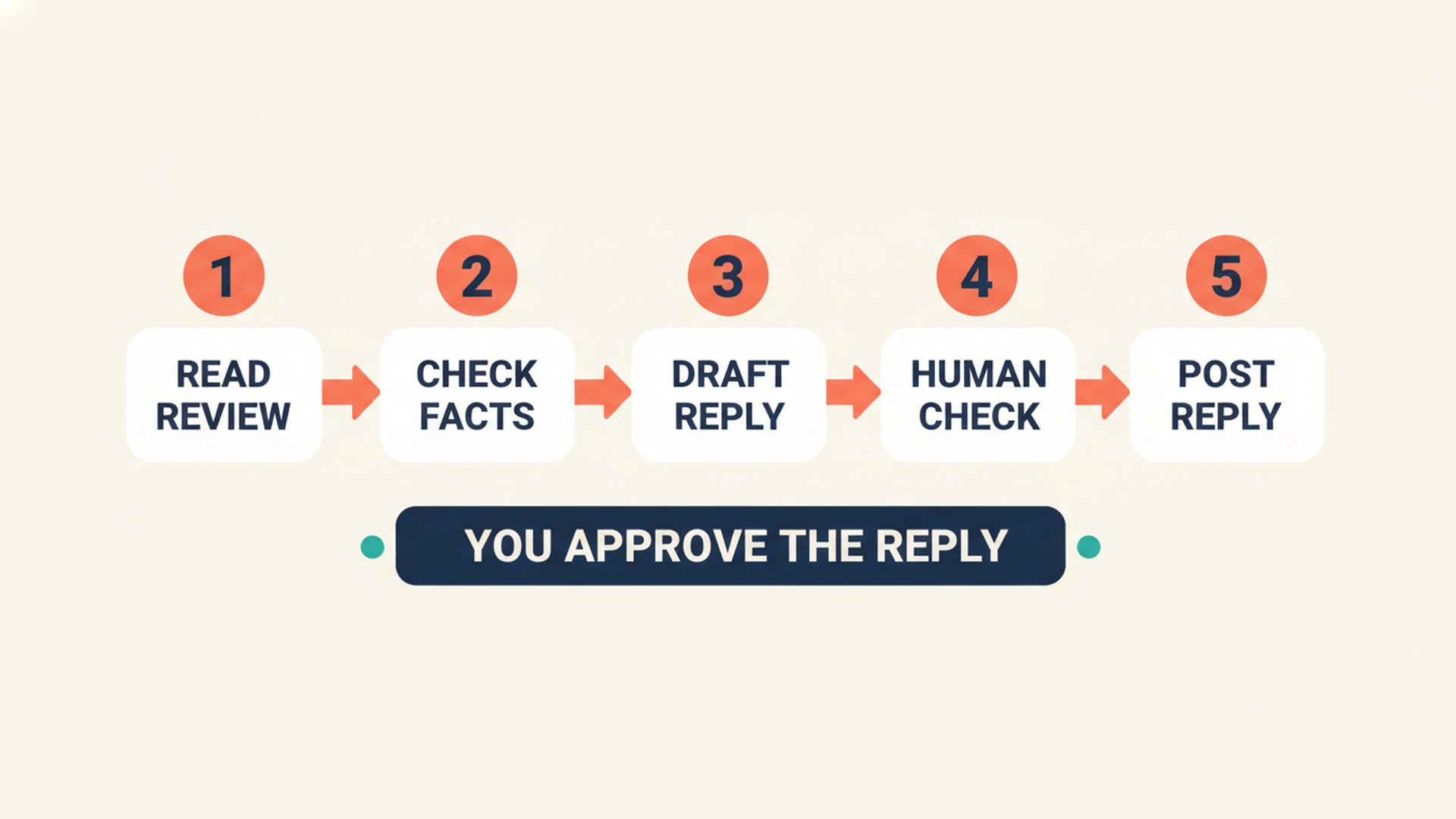
A bot never posts the reply, claims the profile, or removes reviews. A person must always check the drafted names, facts, and tone. You must also verify that no private customer details were included and that the text follows Google's policies against promotional offers or incentives. Once you approve the draft, you manually paste the approved text into your Business Profile.
Where does the ExtraHeads SERM Specialist role fit?
The SERM Specialist is an AI template for Grok Bot that plans search engine reputation and review site presence. It helps audit what customers see when they search for the brand and draft standardized, ethical responses to public feedback. You can view an illustrative sample of the response-planning format to see how it organizes complaints.
The role prepares by auditing provided branded search results to identify missing directory profiles, drafting neutral email outlines for ethical feedback collection, and preparing standardized response templates for common public customer complaints. It does not create fake reviews, recommend incentivized review generation, or violate platform guidelines. It does not optimize website pages directly (that is the SEO Specialist) or do public relations outreach (that is the PR Manager).
The buyer reviews and implements the work. You must review and approve response drafts before pasting them into public platforms, manually claim, verify, and update profiles on external directory sites, and make sure all communication workflows comply with current live platform policies. The SERM Specialist does not provide legal advice, guarantee the removal of negative reviews, or report defamatory content to platforms; legal or reporting actions must be handled by the buyer or their legal counsel.
The SERM Specialist is $19 USD as one role, or $99 USD for all 22 roles, paid once. ExtraHeads does not sell Grok Bot access. After payment the buyer receives a public template link, opens it, selects Add to Grok Bot and confirms Add Bot to create their own copy. Roles do not connect automatically. ExtraHeads sells this role template, so it has a commercial interest, and it is independent, not affiliated with xAI or X. The reply templates on this page are ExtraHeads examples, not official Google text and not client results.
Frequently asked questions
How do you respond to a negative Google review?
To respond, open your verified Business Profile, select Read reviews, and select Reply next to the specific review. Draft a short, professional response that addresses the issue without sharing private details or offering promotional incentives.
Should you apologize in a Google review reply?
Google's tips say to apologize when appropriate and to show empathy. That does not mean you should take responsibility for things outside your control.
Can I offer a discount if the customer updates or removes their review?
No. Offering incentives, such as payment, discounts, or free goods or services, in exchange for a customer posting, changing, or removing a review is considered fake and misleading content and is strictly prohibited.
How long does Google take to post my reply?
Google reviews your replies to make sure they follow content policies. This usually takes up to 10 minutes, but sometimes a review can take up to 30 days before it is publicly posted under the customer's review.
Is it okay to ask only happy customers to leave a Google review?
No. Google does not allow merchants to discourage or prohibit negative reviews, or to selectively solicit positive reviews from customers. That kind of selective ask is often called review gating.